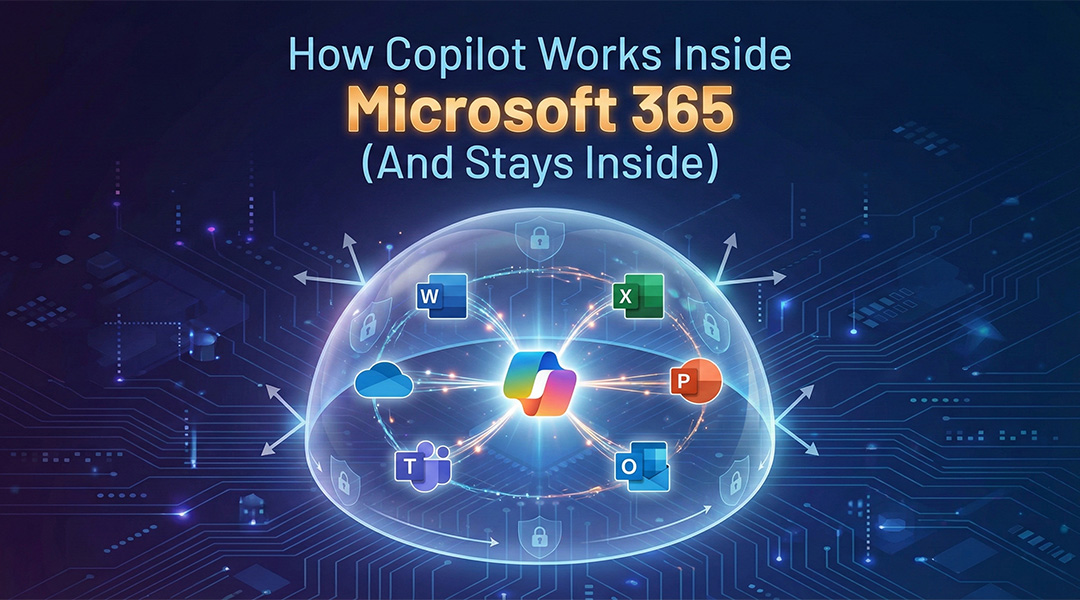
AI is moving fast, and many businesses are excited about what Microsoft Copilot can do. At the same time, there’s a very real concern behind almost every conversation: “Where does our company data go when we use AI?”. With Microsoft 365 Copilot, the short answer is reassuring: your data stays inside your Microsoft 365 environment. In this article, we explain how Copilot works inside Microsoft 365, what it can (and cannot) access, and why it’s designed for business use, not public AI experimentation and AI learning.
What Is Microsoft 365 Copilot?
Microsoft 365 Copilot is an AI assistant built directly into the Microsoft 365 apps you already use every day, such as:
- Outlook
- Word
- Excel
- PowerPoint
- Teams
- SharePoint
Instead of being a separate tool, Copilot works within these applications and helps you write, summarize, analyze, search, and prepare content using your existing work data.
How Copilot Uses Your Data
Copilot does not roam freely across the internet or your entire IT environment. Every interaction is handled in a controlled way, based on three elements:
- Your prompt – what you explicitly ask Copilot to do
- Your Microsoft 365 data – emails, files, chats, meetings, and documents you already have access to
- Microsoft’s AI models – which process the request and generate an answer
Copilot combines these elements at the moment you ask the question. It does not continuously scan your data, and it does not build a separate database of company information.
The key point remains crucial:
Copilot can only access data that you are already allowed to see.
If you don’t have permission to open a file, mailbox, or Teams channel, Copilot can’t use it either.
Your Data Stays Inside Your Tenant
One of the biggest differences between Microsoft 365 Copilot and public AI tools is how data is handled.
With Copilot:
- Your company data is not used to train public AI models
- Prompts and responses are not shared with other customers or organizations
- Data processing happens within Microsoft’s secure enterprise environment
- Your information remains inside your Microsoft 365 tenant and its security boundaries
This is fundamentally different from consumer AI tools, where prompts may be stored or reused for training.
For organizations working with sensitive, confidential, or regulated information, this distinction is essential.
Security and Access Control
Microsoft 365 Copilot is built on top of the same security and compliance framework you already rely on.
Copilot automatically respects:
- User roles, permissions, and group memberships
- SharePoint, Teams, and mailbox access rules
- Sensitivity labels and data classification
- Retention, audit, and compliance policies
This means Copilot doesn’t introduce new access paths to your data. It simply works within the boundaries that are already defined.
If a document is marked confidential, Copilot treats it as such. If content is restricted to a specific team, Copilot won’t expose it outside that scope.
What Copilot Does Not Do
To avoid common misunderstandings, it’s important to be very clear about what Copilot does not do:
- It does not send your data to public or consumer AI platforms
- It does not use your company data to train models for other customers
- It does not bypass permissions, security settings, or access controls
- It does not magically understand context that doesn’t exist in your data
Copilot is designed for controlled, business-grade AI, not open experimentation or uncontrolled data sharing.
Real-Life Examples: Copilot in Daily Work
To make this more tangible, here are a few practical examples of how Microsoft 365 Copilot is used in everyday business scenarios, without exposing data outside your organization.
In Outlook
Copilot can summarize long email threads, highlight action points, or help draft a reply based on the conversation history you already have access to. It doesn’t read other mailboxes or hidden folders, only what’s in scope for your account.
In Teams
Missed a meeting? Copilot can generate a summary, list decisions, and extract follow-up actions from the meeting chat and recordings, but only for meetings you were invited to or allowed to access.
In Word
Copilot can help rewrite or structure documents using existing files, notes, or references you select. It won’t pull in random documents from across the company.
In Excel
Copilot can analyze tables, explain trends, or help create formulas based on the data in your file, without exporting that data anywhere else.
In all cases, Copilot works inside the app, inside your permissions, and inside your Microsoft 365 environment.
Why Preparation Matters
Copilot works best when your Microsoft 365 environment is well-organized and up to date.
Because Copilot builds its answers from your existing data, the quality of that data directly affects the quality of the results.
Good preparation includes:
- Logical file structures in SharePoint and Teams
- Clearly defined ownership of documents and folders
- Correct permissions and access rights
- Archiving or cleaning up outdated content
Without this foundation, Copilot may still provide answers, but they may be incomplete, outdated, or less reliable.
In other words: Copilot doesn’t replace good information management- it rewards it.
AI Done Right: Productive and Secure
Microsoft 365 Copilot shows that AI and data security don’t have to be opposites.
When implemented correctly, Copilot helps teams:
Save time on repetitive writing and summarization tasks
Quickly find relevant information across emails, files, and chats
Prepare reports, presentations, and meeting summaries faster
Turn existing company data into practical, actionable insights
All while keeping company information exactly where it belongs.
Frequently Asked Questions
Can Copilot see all company data?
No. Copilot can only access data that the signed-in user already has permission to view. It cannot see data from other teams, departments, or mailboxes unless access is explicitly granted.
Is our data used to train AI models?
No. Microsoft does not use your company data, prompts, or Copilot responses to train public or shared AI models.
Can Copilot accidentally leak sensitive information?
Copilot respects sensitivity labels, permissions, and access controls. If your security model is set up correctly, Copilot will not expose confidential data to unauthorized users.
Does Copilot search the internet?
Copilot focuses on your Microsoft 365 data. Any external information is clearly separated and does not mix with internal company content unless you explicitly request it.
Do we need to change our security setup before using Copilot?
Not necessarily, but Copilot often highlights where permissions, file structures, or data governance could be improved.
Copilot isn’t about giving AI unlimited access to your data. It’s about using AI responsibly inside a secured, business-controlled environment.
For organizations that want the benefits of AI without losing control, Microsoft 365 Copilot is a powerful next step, provided it’s implemented with the right structure, permissions, and guidance in place.
How ITAF Helps You Use Copilot the Right Way
Microsoft 365 Copilot delivers the most value when it’s implemented in a well-structured and secure environment. That’s where ITAF comes in.
We help organizations prepare, implement, and use Copilot in a way that is productive, secure, and aligned with how your business actually works.